Kiln 1.0 is here.
Since our last release and blog post, Kiln kept moving. We kept building, day in and day out: printer control, safety, slicing, recovery, design intelligence, command-line coverage, and a much larger MCP surface for agents.
One important context note: kiln-pro did not formally exist when v0.2.1 came out. Back then, Kiln was effectively one public open-source project. v1.0 is also the release where the boundary became explicit. Public Kiln stays local-first, inspectable, and agent-facing. kiln-pro is the paid layer for people who want deeper workflows around their printer: Git for 3D branching and signed releases, the full decoration and texture engine, automated assembly manuals, recovery, hosted execution, fleet, billing, team, and enterprise controls.
v1.0 is not a pivot into a browser-first printer app. Kiln is still infrastructure: an MCP server and CLI that let AI agents work with physical printers through typed, inspectable, safety-checked tools.
The web app has one job right now: the Git-for-3D experience. It is a repository-style surface for 3D objects, not an agent conversation UI. You push designs from the CLI or an MCP client, then use the web workshop to browse designs, branch, review mesh diffs, approve pull requests, sign releases, and trace object history.
The core loop stays local and agent-native:
In your MCP client or terminal: describe the part, generate or import geometry, check material and printer constraints, slice, preflight, print, monitor, and recover when the real world interrupts.
The numbers
| Surface | v0.2.1 | v1.0 | Delta |
|---|---|---|---|
| MCP tools | 273 | 756 | +483 |
| Total MCP capabilities | 273+ | 763 | tools, prompts, and resources |
| CLI commands | 107 | 215 | +108 |
| Collected tests | ~5,900 | 13,252 | +7,352 |
| Design intelligence | early catalog | 25 FDM materials, 45 brand filament profiles, 20 patterns | production-grade recommendations |
| Printer safety profiles | 9 | 44 named model profiles | broader hardware-specific limits |
The important part is not just that Kiln got bigger. It is that the surface is now usable at that size.
Agents do not need to load every schema up front. Kiln exposes manifests and discovery tools so an agent can search for the right capability when it needs it: printer status, slicing, AMS, filament, preflight, recovery, semantic diffs, fulfillment, fleet routing, or release signing.
The catalog is large because physical manufacturing has a lot of edge cases. The interaction stays small.
What ships in v1.0
1. A much larger MCP surface
Kiln's primary interface is MCP:
python3 -m pip install kiln3d
kiln install-mcp
kiln serve
Any MCP-compatible agent can discover and call Kiln tools. The tools are typed, scoped, and designed around physical actions rather than generic API endpoints.
That distinction matters. A printer is not a database. A model should not be allowed to improvise around heater limits, bed bounds, material constraints, or preflight checks. Kiln gives agents enough surface area to be useful without letting them treat hardware like text.
2. A CLI that can carry the whole workflow
The CLI is not a thin wrapper around a demo. v1.0 exposes 215 commands for people who want terminal-first control or scriptable automation:
kiln whoami
kiln tools
kiln install-mcp
kiln serve
The CLI also makes Kiln easier to debug. When an MCP client behaves strangely, the same underlying action can usually be checked directly from the terminal. That keeps the system inspectable.
3. A repository-style web workshop for 3D objects
The web app exists, but it is not where users converse with agents and it is not trying to replace the MCP/CLI workflow.
The current web app is a repository-style workshop for artifacts that come from Kiln's agent and CLI surfaces. The code path is intentionally mirror-like: UI actions call the same MCP tools through POST /api/tools/<tool_name> instead of inventing a separate browser-only product.
What it does today:
- Workshop dashboard - a private contribution-style view of your designs, branches, signed releases, contribution heatmap, pinned designs, and recent activity.
- Designs - list design repositories, create an empty design slot, and then push the first mesh from your AI agent or CLI.
- Branches - create and inspect branches for a design, with branch trees and per-branch history.
- Compare - compare two branches and inspect the mesh diff; added geometry, removed geometry, and unchanged geometry are shown distinctly.
- Pull requests - review proposed design changes with conversation, mesh diff, approval gate, files, and actions for approve, request changes, merge, or close.
- Releases - sign a specific design version with provenance so downstream users can verify what was shipped.
- Ancestry and reflog - trace a design's version chain and head-mutating operation history.
- Remotes - manage Kiln Cloud remotes for pushing branches, pulling releases, and syncing print outcomes.
- Connect - mint a pairing code so your local CLI/MCP server can attach this machine to your account and tier.
That is the right web app shape for v1.0: a place to review and govern physical design history after the work comes in from MCP or the terminal. The web app will keep growing from here, but this release is intentionally scoped around design history, review, releases, and pairing.
kiln pair KLN-...
kiln whoami
Pairing writes local auth state so the CLI and MCP server can resolve your account and tier. After that, the agent still works through Kiln's local command and tool surface.
4. Git for 3D printing
3D files should not behave like anonymous blobs.
Kiln 1.0 gives physical designs a versioning layer: branches, merges, signed releases, external mesh imports with provenance reconstruction, semantic diffs, and outcome-aware review.
A change is not just "some bytes changed." Kiln can track manufacturing-relevant differences: bounding boxes, Z-level contours, pockets, decorations, feature records, and recorded print outcomes.
That lets you ask better questions before making a part real:
- Did this change alter the geometry in a way that matters?
- Did similar changes improve or regress past prints?
- Is this release the same mesh that was signed?
- Which version produced the object on the table?
Software teams take those guarantees for granted. Physical design needs them more, not less.
5. Design intelligence before geometry
Kiln's design intelligence layer now includes 25 FDM materials, 45 brand-specific filament profiles, 18 design templates, load tables, environment compatibility rules, post-processing guidance, and material troubleshooting.
That means an agent can reason before it generates or prints:
- indoor cosmetic print or outdoor functional part
- rigid bracket or flexible component
- heat exposure, moisture, creep, impact, or UV
- snap fit, living hinge, press fit, threaded insert, or reinforced beam
- printer capability and loaded material
The point is simple: stop treating generation as the first step. In physical manufacturing, constraints come first.
6. Safety as a protocol requirement
Kiln 1.0 treats safety as part of the interface, not a warning in the docs.
The safety stack includes:
- 44 named printer-model safety profiles
- G-code validation before dangerous commands reach hardware
- temperature, feedrate, flow, and build-volume checks
- preview-confirmed print starts
- non-optional preflight checks
- emergency stop and heater watchdog paths
- audit events for tool calls and production actions
An AI agent can be useful around hardware only if the safety layer is stronger than the prompt.
7. Recovery for real printer behavior
Printers do not fail politely.
Networks drop. Firmware pauses. Nozzles cool. A bed that was clear at upload time may not be clear when a retry starts. Startup G-code that is safe for a fresh print can be unsafe for a same-bed resume.
v1.0 adds recovery work for that reality:
- resume paused jobs that cooled below extrusion temperature
- preserve safe printer state before continuing
- validate same-bed retry against bed clearance and startup safety
- rewrite or quarantine unsafe startup sequences instead of trusting them blindly
- retry on the same build plate only when Kiln can place the new attempt in a clear zone, away from the failed remnant, objects already on the plate, purge/wipe/probe paths, and calibration regions
- decide whether fleet recovery should rerun the job on another idle, compatible printer, with material, build-volume, progress, cooldown, attempt-limit, and safety-critical checks attached to the decision
- fail closed when the printer state is ambiguous
The goal is not to make printers magical. The goal is to make recovery boring enough that an agent can do the right thing without guessing.
8. Texture and decoration engines
Texture and decoration deserve their own place in the release because they are where Kiln starts feeling less like "printer control" and more like physical object editing.
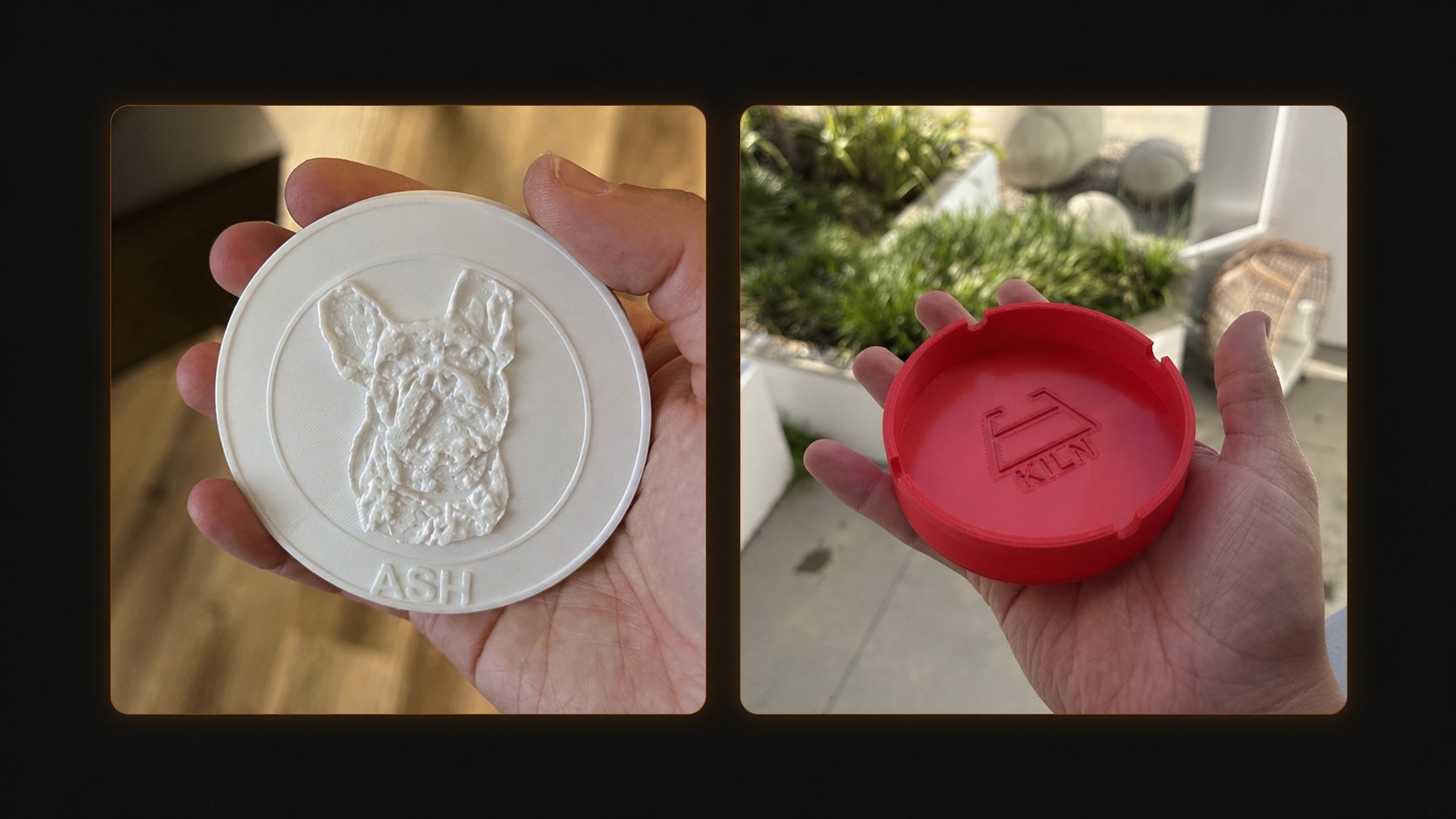
The texture engine applies procedural and image-based surface treatments to arbitrary meshes and exports print-ready multicolor 3MF. The details matter:
- procedural patterns such as alligator, wood grain, tiger stripe, camo, digital camo, ocean, galaxy, tie-dye, glitch, cells, noise, and stripes
- mesh subdivision so a low-face-count STL has enough surface samples to carry the pattern
- seamless cylindrical mapping for mugs, vases, and curved walls
- shared preview/output mapping so the preview and exported 3MF agree
- pure-Python 3MF composition for slicer-ready multicolor output
- image-based heightmaps for photos, logos, and other visual sources
The decoration engine sits one level above that. Users and agents should not need to memorize whether a logo needs image deboss, heightmap texture, QR generation, text emboss, or a template-specific placement rule. v1.0 moves toward a declarative surface:
decorate_surface(
    model_path="mug.stl",
    face="front",
    decoration={"type": "image", "source": "logo.png"}
)
Kiln handles the technique selection, depth, face geometry, posterization, material interaction, and safety checks. It can discover decoratable faces, apply different decorations to different faces, register reusable brand assets, auto-thicken thin floors when front/back decorations would collide, and record successful decoration settings so future prints can reuse proven parameters.
Some of these workflows are paid or quota-gated through kiln-pro. The public MCP and CLI surfaces remain the way agents discover, request, and reason about them. Hosted execution handles tier checks and server-side implementation where needed.
9. Assembly manuals for printed objects
Multi-part prints need instructions as much as they need geometry.
kiln-pro can generate printable assembly manual PDFs for multi-part objects, with an exploded cover, bill of materials, step-by-step isometric renders, tool and fastener context, confidence calibration, and sidecar proof artifacts. The manual stack can also keep revision history, load a previous manual spec, compare manual revisions, render a "what changed" PDF, and embed the manual plus a signed manifest into a 3MF.
The tier boundary matters here too. Pro covers personal single-language manuals with Kiln attribution. Business adds the commercial workflow: co-branding, multilingual PDFs, change-only manuals for shipped revisions, and buyer-side authenticity checks.
This is the same product thesis as Git for 3D: a physical object should not be a loose file. It should carry instructions, provenance, and review history with it.
10. Fleet and fulfillment foundations
Kiln 1.0 is FDM-first because that is where the product is real today.
Inside that scope, the release expands the foundation for:
- mixed local printer fleets
- material-aware routing
- recovery and reroute planning
- per-part economics for quoted plates
- third-party fulfillment routing through providers such as Craftcloud
- team, audit, SSO, and access-control surfaces in paid tiers
Kiln does not operate its own manufacturing marketplace. It orchestrates local printers and connected third-party providers while keeping the agent-facing control layer consistent.
The open and paid boundary
Kiln has two sides:
- Kiln - the public AGPL-3.0 package installed with
pip install kiln3d - kiln-pro - the private paid companion behind deeper printer workflows, hosted execution, and commercial operations
That split is new since the last public blog post. It is not a rewrite of what Kiln is; it is the boundary that lets the open tool stay useful while the business-grade operations have a real home.
The public side should stay inspectable, local-first, and safe. The paid side should pay for the parts that took real product work and give users more leverage around their own printer: the full decoration and texture engine, Git for 3D branching and signed releases, versioned decoration presets, automated assembly manuals, recovery and resume, print-outcome learning, hosted execution, and higher quotas.
Then Business and Enterprise add the operational layer: commercial use, team workflows, fleet operations, co-branded and multilingual manuals, auditability, SSO, access control, custom safety profiles, and support.
Free users do not need proprietary code copied into the public repo to try paid workflows. The hosted tool path exists so pro tools can run server-side with quota and tier checks while the implementation stays private.
Patent-pending work
Parts of the Kiln v1.0 stack are patent-pending.
The goal is simple: keep the public infrastructure open while protecting the parts of physical-agent manufacturing that took real work to build.
Install
python3 -m pip install kiln3d
kiln install-mcp
kiln signin
kiln whoami
kiln serve
Or pair from the web app:
kiln pair KLN-...
kiln whoami
Links:
- GitHub: github.com/codeofaxel/Kiln
- Docs: kiln3d.com/docs
- Pricing: kiln3d.com/pricing
What is next
v1.0 is real infrastructure, not an experiment.
There is lots more to come.
For now: Kiln 1.0 is live.
The quiet part is over. Let's build.
Update (2026-06-10): Kiln has since moved auto-generated assembly manuals and the bill of materials to the Business tier; Pro keeps multi-part assembly design. See current pricing for the latest.