Kiln 1.4.0 opens both ends of the loop. The design your AI agent makes can now leave Kiln as a real CAD file, the kind a machine shop opens and measures, free like STL and 3MF. And the print you are waiting on is something you can actually watch: the new Monitor at kiln3d.com/monitor shows your printer’s camera, temperatures, progress, and a layer-by-layer 3D view of the object being built, with pause and stop right there. In between, you can paint a model by pointing at its own surfaces, aim any print or stop at a printer by name, and slice with OrcaSlicer or BambuStudio. Plus plenty of fixes and better support for the printer models Kiln can run. Most of what is in this release is free. The deeper engineering features are Kiln Pro and Business.
Your designs leave as real CAD files
A 3D print file is triangles. It prints fine, but hand it to a machine shop, a client, or a CAD program and it is a dead end: nothing to measure, nothing to edit, no real surfaces. Until now, nothing Kiln made could become STEP (the CAD format every engineering tool and machine shop speaks).
Now, any Kiln design can be exported as a STEP: one clean solid with exact dimensions, not a mesh wearing a CAD extension. Ask your AI agent for the part as CAD and that is what leaves. And when a design genuinely cannot be CAD (a photo relief, text wrapped over a curve), Kiln says so plainly instead of faking a file that would fall apart under measurement.
A nameplate designed in Kiln, exported as STEP, opened in Fusion. Real faces, real edges, real dimensions, not a mesh wearing a CAD extension.
The other direction got better too: open a STEP file in chat, in the web app, or from a shared link, and it shows up labelled as CAD with the exact dimensions the file itself defines, in the colours the file itself carries, with every part keeping its own name and colour. And the print questions you would ask of any model (“which way up should this print, will it warp, how much support material?”) now take a STEP file directly, no converting it yourself first.
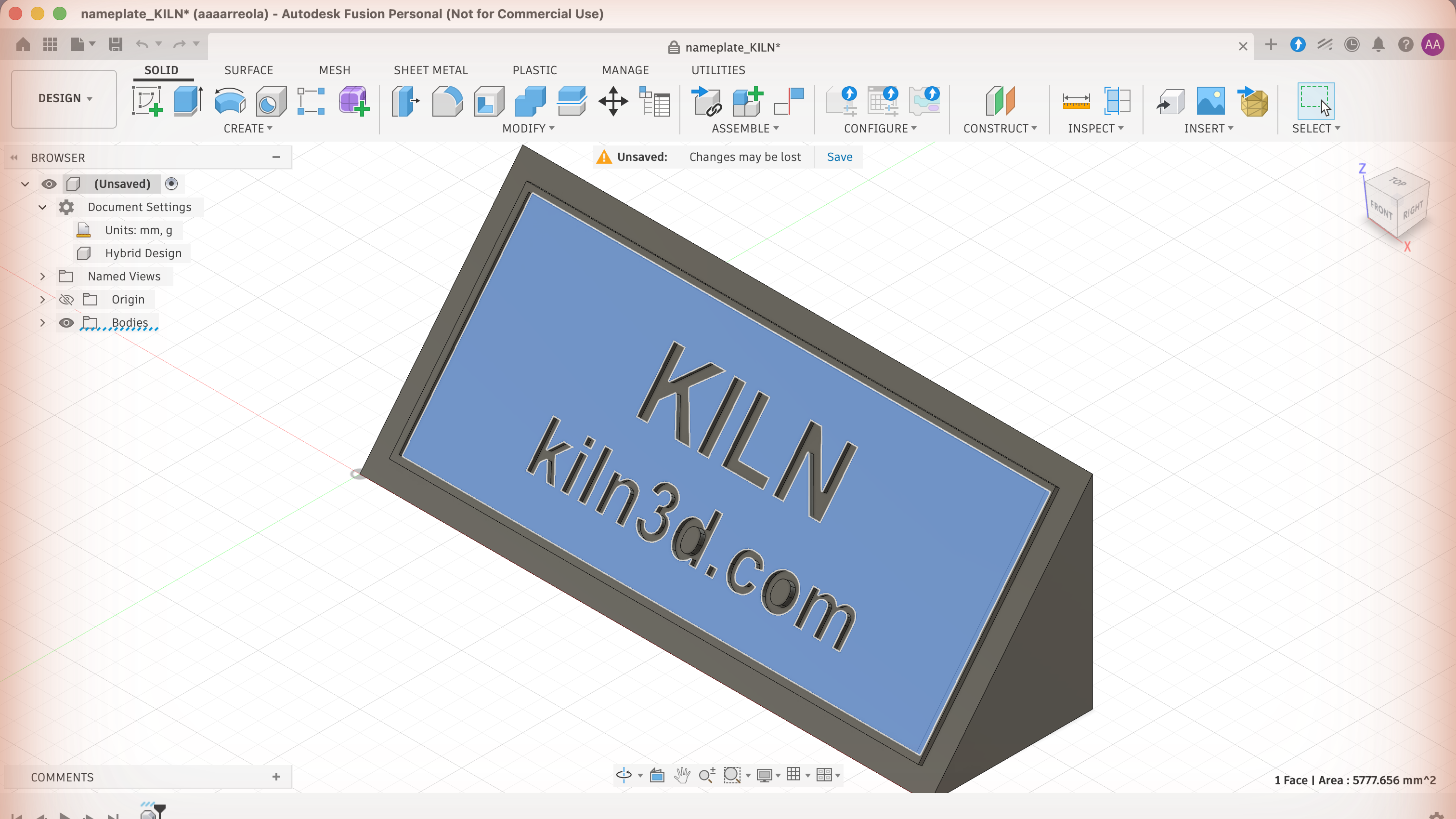
Click a face and it measures. That is the difference between a CAD file and a pile of triangles.
One honest caveat comes with reading CAD: converting a STEP into a printable mesh is an approximation, and repairing that mesh can move it again. Kiln Pro measures how close the conversion stayed and keeps that record with the part, so you can still get those answers months later. See pricing.
Watch your printer from the web
The new Monitor at kiln3d.com/monitor is a live page for the printer you own: the camera feed, nozzle and bed temperatures, progress, time remaining, and pause, resume, and stop buttons on the same screen. It works from any browser, wherever you are.
The Monitor tab also shows the actual object being built, layer by layer, as a 3D model. Kiln keeps the model and toolpath of prints it sliced, and can send that pair to your own web app so the Monitor draws your print growing in real time. Nothing leaves your machine unless you ask.
When a reading has gone stale, the Monitor says so, instead of presenting old numbers as live. Watching is free with a Kiln account and a connected printer, and the page polls your printer directly, so leaving it open costs you nothing in AI usage.
There is no AI in the Monitor tab itself. It reads your printer and shows you what it says, which is what you want when you just need to see the thing. When you want judgment rather than numbers, that is still your AI agent’s job, and it can watch the same print: ask it to keep an eye on the print and it will follow along and tell you if something looks wrong.
Paint a model by its own surfaces
Ask Kiln to colour a part of a model (“make the handle orange, the lid black”) and it finds the model’s natural surfaces, shows you which is which, and paints the ones you choose. Out comes a printable file your slicer reads natively, with a suggested filament slot for each colour. It works on models Kiln made, CAD you brought in, or a mesh you downloaded. Free.
Prefer to do it by hand? There is now a Paint tab in the web app, on the Create page and on a saved design’s page. Click a surface, pick a colour, and every click paints while a colour is armed. You see the result instantly, and one Keep writes the printable file with the colours built in. No agent needed, no tokens spent.
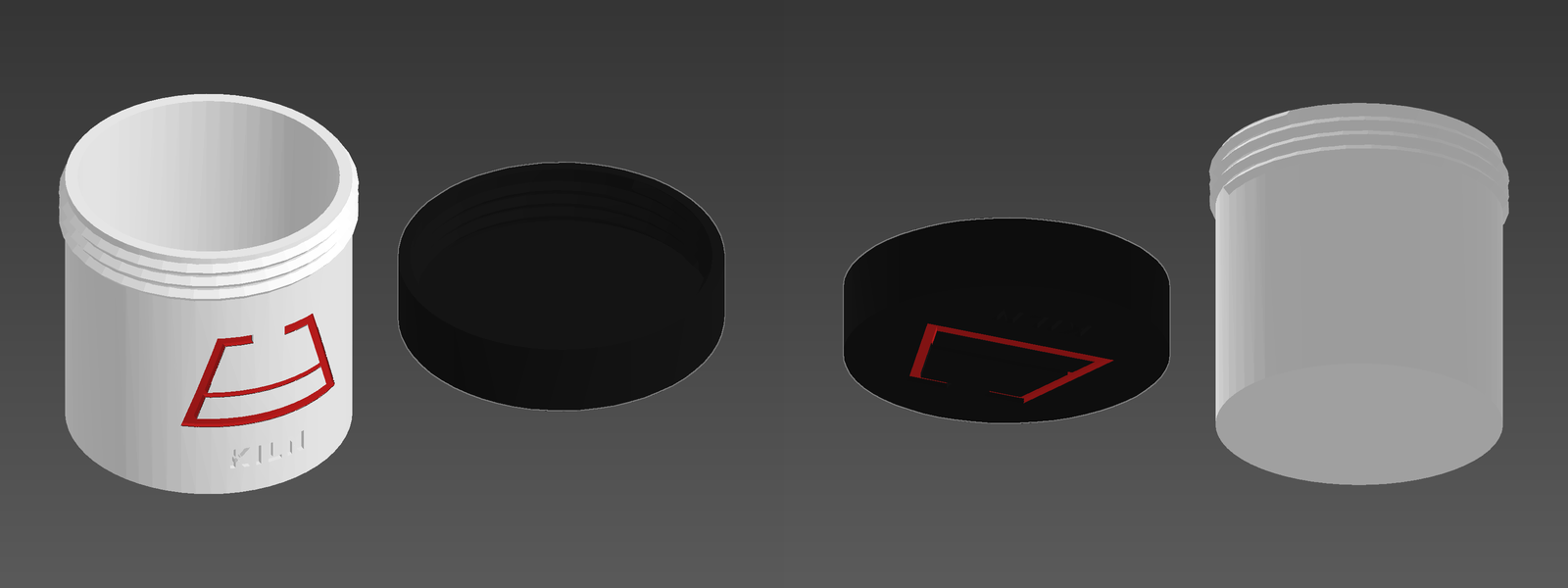
One jar, three filaments. The mark on the wall and the lid’s logo were painted by pointing at those surfaces; nothing else was touched.
Your model, shown properly
Previews look like product photos. Kiln’s preview pictures get the same studio lighting as the 3D viewer, in your chosen filament colour, instead of the flat grey render.
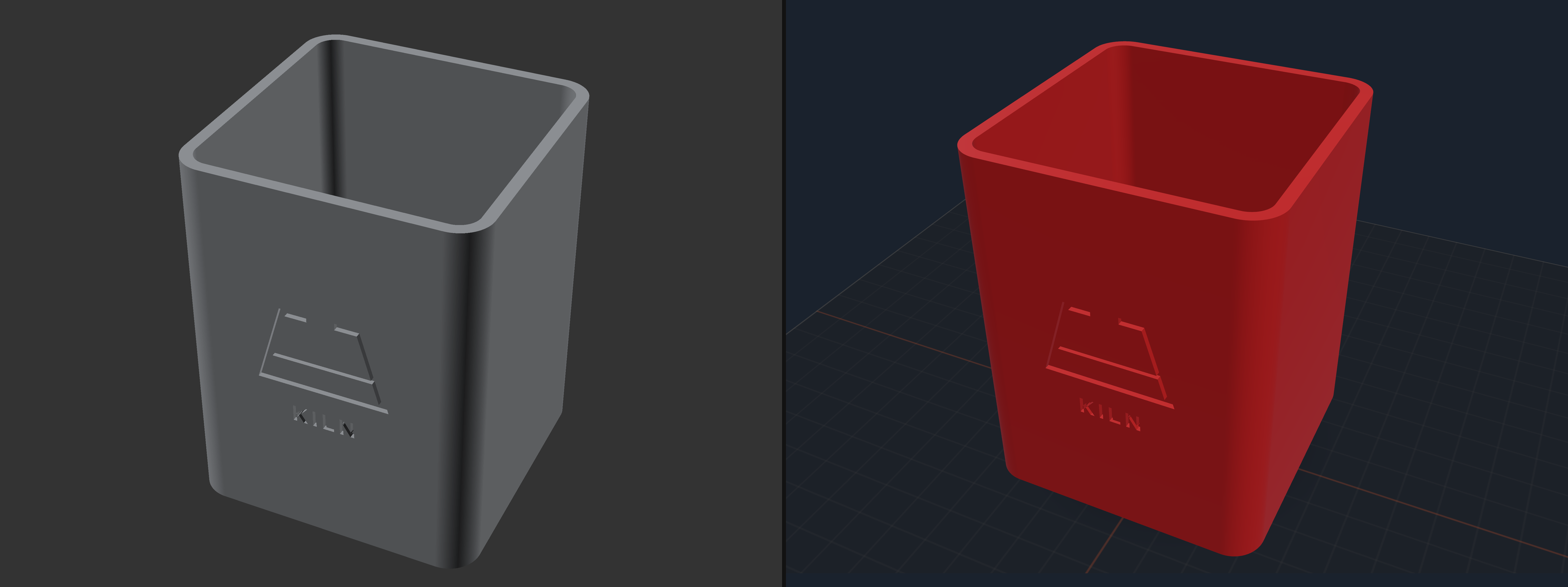
Same model. Flat grey before; your filament colour, studio lighting, and the print bed after.
And the 3D stage opens for everything. The interactive 3D panel used to open only for models Kiln designs from scratch. Now it opens for the rest of your work: CAD you brought in, a mesh Kiln repaired, a part it scaled, hollowed, split, or merged. The model you did not draw is the one you most need to look at before you print it, and the bed check comes with it, so a part too big for your machine says so.
Two printers, no crossed wires
If you own more than one printer, Kiln’s commands now aim where you point them. Cancel, pause, resume, and status all take a printer name, so the machine you name is the machine that answers, instead of whatever your default happens to be. Each machine keeps its own books too: a paused printer holds its own temperatures, and a cancelled print is remembered as cancelled on the machine where it happened. Naming no printer still means your default, so nothing changes if you have one machine. Running more than one printer through Kiln is a Kiln Business feature.
Kiln also names the printer you actually have now, so your printer list says A1 or MK4S or Ender-3 V2, not just the brand. Bambu, PrusaLink, Elegoo, and USB-connected Marlin machines report their own model, with nothing to set up.
Your printer can ask you before it prints
This one is built on elicitation, a recent addition to the Model Context Protocol (the open standard that lets AI agents use tools), which lets Kiln put a question directly in front of you instead of handing it to your AI agent to relay. Starting a print raises a dialog naming the exact file, and your agent cannot answer it for you. It works in Claude Code today, and appears in other apps as they add support. Where an app has not, the approval step you already had is unchanged.
Kiln works with OrcaSlicer and BambuStudio now
A slicer turns a model into printer instructions, and Kiln had listed OrcaSlicer and BambuStudio as supported for a long time while only ever being able to properly drive PrusaSlicer. If one of those was the slicer you had, you hit a confusing error instead of a print. That is fixed the real way: Kiln works out which slicer you have and talks to it properly, and your existing printer settings carry over untouched. There is nothing to set up.
Split a big model and Kiln remembers the kit (Kiln Pro)
Kiln has been able to cut a model too big for your printer into pieces that fit since 1.3.0. New in 1.4.0: the kit is remembered. Split a model on a design’s page and a Save kit to this design button files every piece into that design’s history, with what holds it to its neighbours, anchored to the version you split. Months later you can reprint just the piece that broke instead of re-cutting the whole thing. Every piece also comes back individually downloadable, with stable numbering, on any tier.
For shops, assembly manuals now build their steps from the joints Kiln actually cut, not from re-measuring the pieces afterwards (Kiln Business).
The drawing knows how it prints (Kiln Business)
A dimension on a drawing and the size a printer actually produces are two different numbers, and pretending otherwise is how parts fail inspection. Production drawings from Kiln now label features at the size they will actually print, checked against the design’s own CAD. Anything Kiln cannot confirm is written on the sheet as a note, never as a dimension.
Reading drawings sharpened too. Hand Kiln a customer’s engineering drawing and it can now send back the marked-up sheet, with every dimension it pulled boxed on the drawing itself and colour-coded by how well it checked out. One look tells you whether the read is right before you quote from it.
Kiln checks your design against the numbers you gave it (Kiln Pro)
Mention a dimension while describing what you want (“100mm long”, “four 8mm holes”, “holes 10mm in from each corner”) and Kiln measures the finished design against every one, positions included.
When something misses, Kiln tells you which number and by how much, instead of just handing you a file. You can point it at a file Kiln did not make and get the same plain receipt. And when Kiln could not check something, it says so, so silence never reads as a pass.
The truth pass: your printer, reported honestly
This release closes out a list of places where Kiln presented a guess, or somebody else’s claim, as a checked fact. Each of these was something a real person could hit:
- Stale readings say their age. A paused print could be reported as still running, because the answer came from an update that had stopped arriving. Kiln now tells you how fresh a reading is.
- Told apart from checked. Asked which filament was loaded, Kiln could repeat what someone typed in earlier as though it had measured it. Both answers now say which they are.
- A cold start is not an emergency. Kiln could mistake a printer that was still warming up for a failed one and hit the emergency stop. Thanks to @riverray121, who found it on an Ender-3 V3 SE and fixed it.
- Seven Bambu printers slice and start properly again: P2S, P1S, P1P, X1 Carbon, X1E, H2S, and A1 mini. Thanks to @hype-eth for finding this on a brand-new P2S and proving what was happening from the printer’s own error codes.
- A dropped connection cannot cost you a duplicate print. If your AI agent queues a print and the reply goes missing, retrying returns the original instead of quietly printing it twice. Thanks to @artiehinz for the report.
- When Kiln cannot start, it says why, instead of vanishing from your AI agent with a generic failure.
There is more in the same spirit: honest filament estimates instead of zeros, custom slicer settings that reach the print, multi-colour copies each getting their own spot on the bed, and corrected temperature limits for several machines. The full release notes have every one.
Smaller things that add up
- Your AI agent knows what is free before you ask. Every Kiln tool now tells your AI agent what it costs: free and unlimited, free with a monthly allowance, or part of a paid plan. Ask “can I do this on free?” and it knows, and where a tool needs a paid plan it says what that plan gets you before you run into it.
- Report a problem and Kiln sends the evidence with it. Bug reports now include the tail of Kiln’s activity log, so we can see what broke instead of guessing. Only when you report something, never in the background, and your account name, folder paths, and local network addresses are stripped on your machine first. Reporting works without an account now too.
- Parts that move get a gap sized for your printer (Kiln Pro). On anything that has to turn or slide, the clearance now suits your machine and material instead of one number for everything. Free keeps the standard clearance.
- Tell Kiln your printer’s real hardware. Upgraded to an all-metal hotend? Pick your setup by name and Kiln uses its checked limit for it, and
kiln tempnow respects each machine’s own ceiling instead of one fixed number for everyone. - Fans and lights from the command line.
kiln fan,kiln light, andkiln emergency-tripfor naming the safety input that tripped. - Restarting the printer bridge is one command, however it was set up to run.
- Nameplates get their border frame: a raised pinstripe set in from every edge of the sloped face. Turn it off for a clean plain face.
Full release notes: CHANGELOG.md.
Upgrading
- New here? Run
pip install kiln3d, then follow the install guide to connect Kiln to your AI agent: Claude Desktop, Claude Code, Codex, or any other compatible AI client. Using Claude Code?claude plugin marketplace add codeofaxel/Kilnthenclaude plugin install kiln@kilndoes it in two commands. - Already use Kiln? Run
pip install --upgrade kiln3dto move to 1.4.0. - On a paid tier? Upgrade too, so the drawing, kit, and CAD features line up with what your plan includes.