Works on a free model
No account and no key: one of OpenCode’s built-in free models designed the marble run through Kiln.
Kiln in OpenCode
Kiln gives OpenCode what it needs to design a part, check it will print, and run it on your own printer. It works on OpenCode’s free models, and you approve every print.
OpenCode, on a free model, designed a spiral marble run with Kiln, sliced it for a Bambu Lab A1 with no supports, and handed back the link.
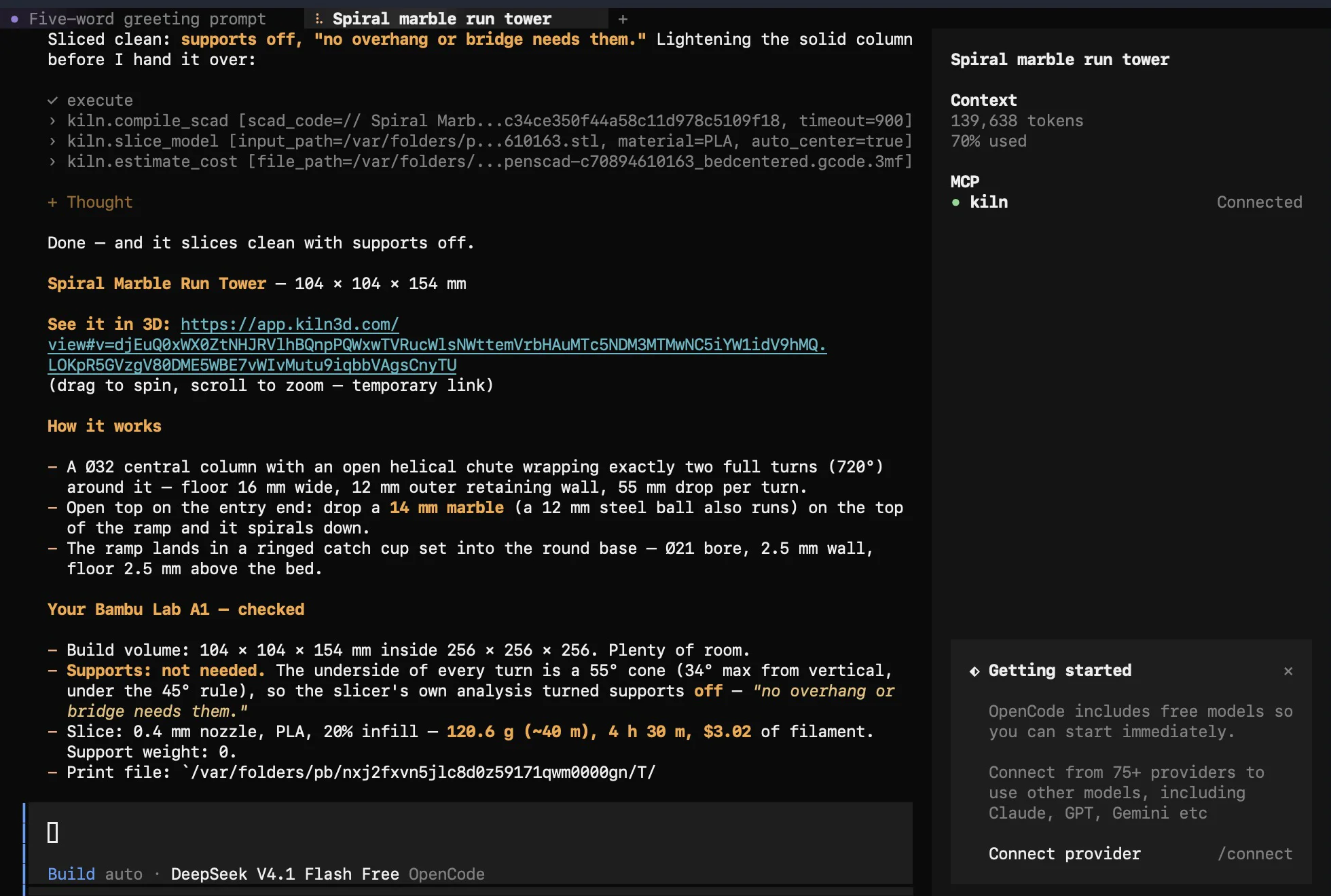
No account and no key: one of OpenCode’s built-in free models designed the marble run through Kiln.
Kiln sliced the tower for a Bambu Lab A1 and turned supports off, because no overhang needed them. With Kiln Pro, it also says exactly what to change when a part is risky.
OpenCode handed back Kiln’s link, and the marble run opened in 3D in a browser, ready to turn over before anything prints.
Tested with OpenCode in the terminal on a Mac. The 3D link lasts about half an hour. Starting and watching a print needs Kiln installed on the computer next to your printer.
The test conversation, shortened
Design a spiral marble run tower for my desk: a marble dropped in the top spirals down two full turns around a central column and rolls out into a little catch cup at the bottom. About 15 cm tall, printable without supports. Check it will print on my Bambu Lab A1 and give me the link to see it in 3D.
OpenCode designs it with Kiln and slices it for your printer
Done, and it slices clean with supports off. Spiral marble run tower, 104 × 104 × 154 mm: 120.6 g of PLA, about 4 h 30 m. Here’s the link to see it in 3D.
The tower opens on Kiln’s 3D stage
What Kiln adds
The same job both ways, from a sentence to an object in your hands.
| Step | OpenCode on its own | OpenCode with Kiln |
|---|---|---|
| Make it | Writes CAD code. Seeing the shape takes a CAD program on your computer. | Kiln builds the model and hands you a link that opens it in 3D. |
| Check it | A problem shows up in the slicer, or partway through the print. | Kiln checks overhangs, thin walls, warping risk, and whether it fits your printer, before anything prints. |
| Change it | Ask again and get new code. Keeping track of which version was better is on you. | Ask for a change in the same chat, and Kiln keeps every try tied to what you first asked for. Save it to your free Kiln account and you get version control: every version kept, and a branch for the risky idea. Pro does it on every design and draws what changed on the part. |
| Slice it | Export the file, open your slicer, and pick the settings. | Kiln slices it in the slicer you already have: PrusaSlicer, OrcaSlicer, or Bambu Studio. |
| Print it | Send the file to your printer yourself. | OpenCode sends it to your printer, and it starts only after you say yes. |
| Watch it | Check on it in the printer’s own app. | Kiln watches every print it starts and stops it if a heater fails. Watch it live on kiln3d.com/monitor, with the camera, progress, and pause and stop, or ask OpenCode how it’s going. |
| More printers | You run each one yourself. | Business runs several at once and picks the printer for each job. Free and Pro drive one at a time. |
The camera shows when your printer has one. A print can still fail, with Kiln or without it; Kiln catches what it can see before the print starts, and asks before it uses your plastic.
A few minutes on the computer next to your printer, with OpenCode installed.
Follow the install guide, or paste its setup message into an agent that can run commands, and it installs Kiln for you.
Run this one line in a terminal. It adds Kiln to OpenCode’s own settings for every project.
opencode mcp add kiln --global -- "$(which kiln)" serveStart OpenCode and describe a part. Its free models work without signing in, or connect a stronger one with /connect. See the printers Kiln works with.
OpenCode hands back Kiln’s link. Open it in your browser to turn the part over before anything prints.
A print uses real plastic on a real machine, so OpenCode can’t start one alone. Kiln shows you the part first, then waits for your yes. Auto-print is off unless you turn it on.
Yes, with Kiln. Describe a part in OpenCode; Kiln designs it, checks it will print, and hands back a link that opens it in 3D in your browser. Kiln runs on the computer next to your printer, so OpenCode can send the print there, and you approve it. Tested in OpenCode in the terminal on a Mac.
Yes. With Kiln connected, OpenCode turns a plain description into a real 3D model you can turn over, measure and change in the same chat, then print or download. No CAD skills needed.
OpenCode can write the code for a 3D model. Kiln builds it, hands you a link that opens it in 3D, checks it will print (overhangs, thin walls, warping, and whether it fits your printer), slices it in your own slicer, and sends it to your printer after you say yes.
OpenCode comes with free models you can use without signing in, and our test ran on one, DeepSeek V4.1 Flash. For harder designs, connect a stronger model such as Claude or GPT with /connect. Kiln does the checking and the printing; the model does the thinking, so a stronger model means better designs and fewer retries.
Install Kiln on the computer next to your printer, then add Kiln to OpenCode’s settings file, ~/.config/opencode/opencode.json, and restart OpenCode. The setup steps on this page take a few minutes.
No. OpenCode comes with free models you can use without signing in, and our test ran on one. You can connect Claude, GPT or others with /connect for harder designs.
OpenCode works in the terminal, so it hands back a link to Kiln’s 3D view. Open it in your browser to turn the part over. The link lasts about half an hour.
No. OpenCode can design a part and Kiln checks it will print on the printer you name. Our marble run was sliced for a Bambu Lab A1 that was switched off. You need a printer, or someone else’s, to make it.
No. Kiln waits for your yes before every print. Auto-print is off unless you turn it on.
Bambu Lab, Creality, Prusa, Elegoo, and most Klipper and OctoPrint machines. The full list is on the supported printers page.
No. Kiln is independent, open-source software you can use from OpenCode. It is not affiliated with or endorsed by Anomaly, the makers of OpenCode.
Kiln is independent, open-source software. It is not affiliated with or endorsed by Anomaly.